
Transfer Google Workspace to a reseller
Move your Google Workspace billing to Canagon, your new reseller. The transfer is free, and your emails, data and settings stay untouched.

A transfer changes who bills you for Google Workspace. After the transfer to Canagon, we will handle your billing, and you will see Canagon in admin.google.com > Billing > Subscriptions. This is all that changes.
Canagon is a certified Google Cloud Partner and Google Workspace reseller. Our reseller public identifier is C02k6n9rq, which you use in the Google Admin console to authorize your transfer to Canagon.
Why companies transfer
Change of billing country or currency
- Change your invoice currency to USD, EUR or GBP.
- Get an invoice with EU or UK VAT.
- Make changes that Google or your current provider cannot make.
Customized billing
- Pay by bank transfer: SEPA or ACH.
- Pay with another local payment method.
- Get a purchase order (PO) with your invoice.
Save money
- Save on licenses with our Hybrid setup. Google Workspace for key users, lower-cost mailboxes for the rest, on one domain.
- Save on support with pay as you go. Pay only when you need help, without a monthly fee.
What changes after the transfer
Your invoices will come from Canagon instead of Google.
In the Google admin console, under Billing > Subscriptions, Canagon will be shown as your reseller.
What stays the same
The transfer is only about licensing. We do not touch your settings, domain or DNS.
- Your emails, files, users and settings stay exactly as they are. Users notice no change.
- All your Google Workspace services continue without interruption.
- All admin roles and user privileges stay the same, including super admin.
- Your agreement with Google stays in place, including Google’s terms and privacy policies.
- Google support stays available. You can contact Google and us.
Pricing after the transfer
With Canagon you pay exactly Google’s official list price, the same price as on Google’s website.
Admin access (optional)
We do not need access to your admin console, for the transfer or afterwards. If you want our help with management, you can give us delegated access. It is logged, needs no extra paid admin user, and you can turn it on or off at any time.
How to begin with the transfer
First you need to generate a transfer authorization in the Google admin console.
- Sign in to https://admin.google.com/ac/resellermanagement with your Google Workspace super-administrator account
- Select the subscription and click Transfer
- Create transfer authorization entering Canagon’s public identifier: C02k6n9rq
- Click Continue
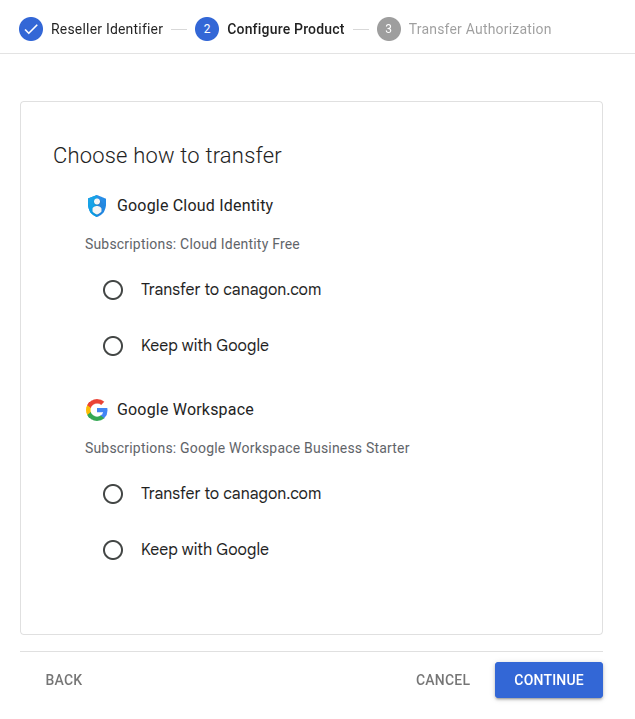
- Select the subscriptions to transfer. Click Continue.
- Click Continue
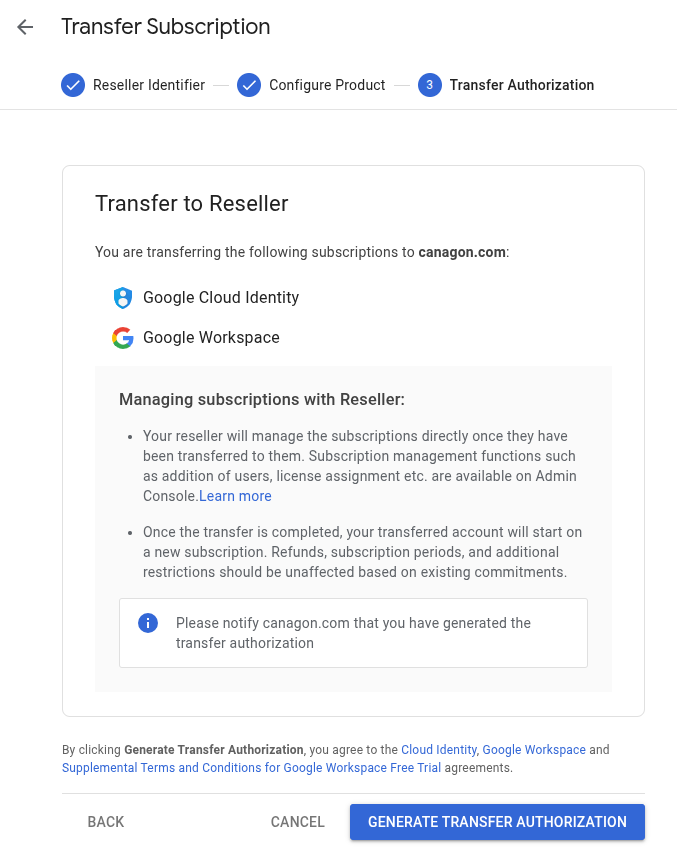
- Click Generate Transfer Authorization
- Complete our transfer form to start the transfer
- After you submit the form, we send you a proforma invoice. We complete the transfer on the day we receive your payment.
Show screenshots for above steps 2-7


Questions about the transfer
Can my Google Workspace be transferred back to Google?
Yes. You are free to change your Google Workspace provider.
https://knowledge.workspace.google.com/admin/billing/transfer-subscriptions-between-google-and-resellers
How long does the transfer take?
We complete the transfer on the day we receive your payment.
Will I pay twice when I transfer? Billing during the transfer, explained.
In the month of the transfer, you receive two invoices:
- One from your current provider, Google or another reseller, for the days up to the transfer date.
- One from Canagon, from the transfer date onwards, at Google’s list price.
The two invoices cover different days, so they do not overlap.
When to transfer:
- If you pay monthly, at any time.
- If you paid a year in advance, the unused months are usually not refunded, so you would pay twice for them. Transfer in the last days before your paid year ends.